

Studio testing
Check index readiness, inspect an agent search, and compare the answer with its evidence.
Studio lets you check both sides of a RAG-enabled application: whether its knowledge index is ready, and whether an agent uses retrieved context when answering a question.
This walkthrough follows the captured Product Support sample: the index is product-support, the agent is Product Support Assistant, and the displayed embedding reference is ollama/deterministic-sample. The sample searches internal support and policy documents to answer a VPN question. Use product-support for both its index registration and the agent's .UseRag(...) configuration.
Verify the RAG configuration
Open Dashboard > RAG Management in Studio and select the registered index. Confirm that its source, vector store, embedding selection, and ingestion strategy match the configuration in your application.
Indexes cannot be created from Dashboard > RAG Management. Register them in application startup code. RAG Management displays registered indexes and manages ingestion start, cancel, and status; it does not define sources or automatically connect an agent to an index.
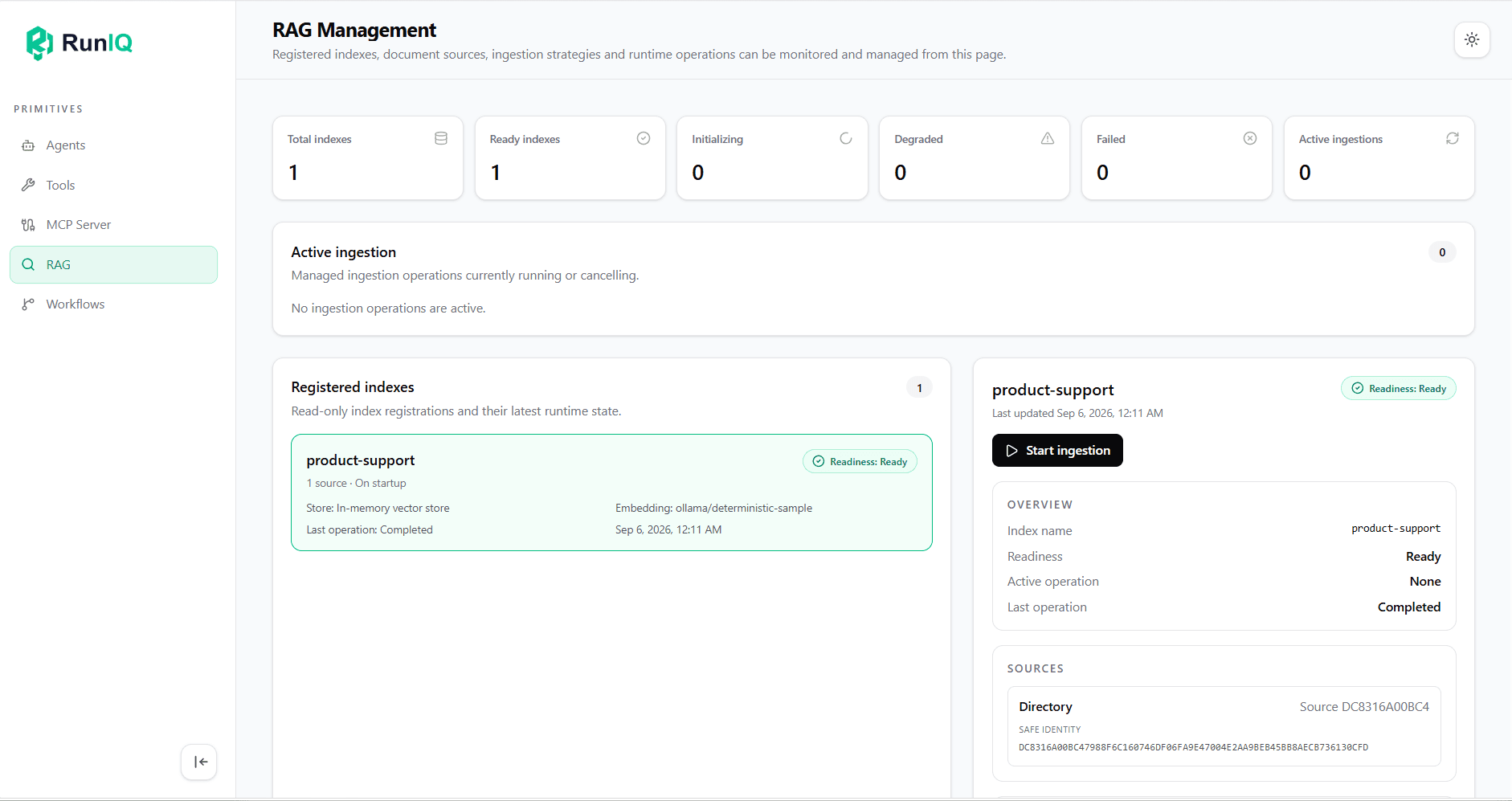
This example shows one registered index with usable ingested content:
| Studio field | Value in this example | What to check |
|---|---|---|
| Total indexes / Ready indexes | 1 / 1 | The expected index is registered and ready. |
| Index name | product-support | This is the collection the agent should query. |
| Source / Strategy | 1 source / On startup | The source count and automatic ingestion trigger match the host configuration. |
| Store | In-memory vector store | This sample uses local, disposable vector storage. |
| Embedding | ollama/deterministic-sample | The displayed embedding reference matches this sample's configuration. |
| Readiness | Ready | The runtime reports usable ingested content. |
| Last operation | Completed | The last ingestion operation finished successfully. |
| Active operation | None | No ingestion is currently running. |
The zero counts for initializing, degraded, failed, and active ingestions describe this captured state. They are not values every application must show at all times. Likewise, use the model and vector store configured for your own application rather than copying the sample's selections.
Ready confirms index readiness; it does not prove that the documents can answer every question. Test a real agent request next. Use Start ingestion when you need an explicit refresh, then inspect readiness and the operation result again.
Query the index through an agent
Open Agents, select the agent configured to use the index, and enter its Playground. In this example, the Product Support Assistant is tested with:
What should I do if my VPN connection does not work? Please answer with the relevant source documents.
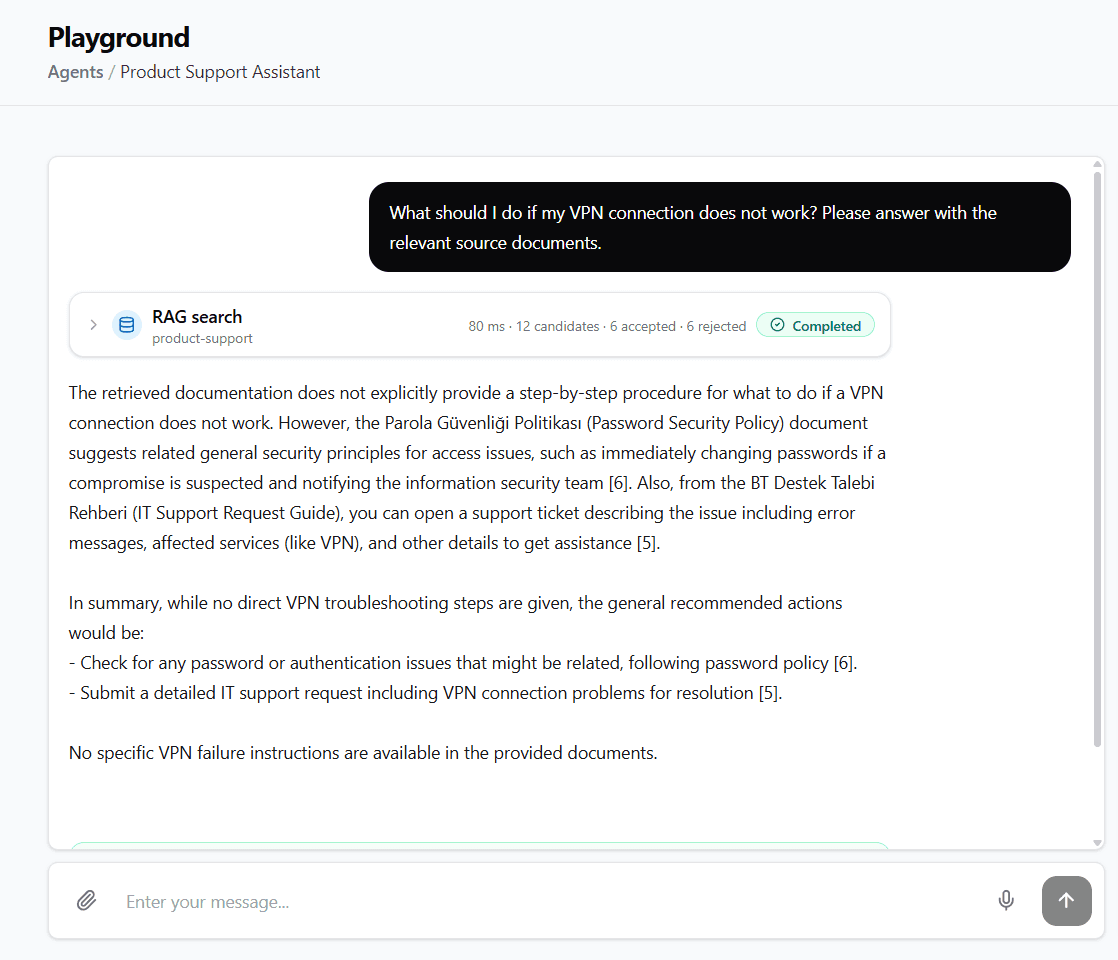
The RAG search card in Agent Chat connects the conversation to the retrieval operation. Here it identifies product-support and reports Completed, with 12 candidates, 6 accepted, and 6 rejected. The displayed 80 ms is the timing for this captured search, not a performance guarantee or the duration of the entire agent response.
By default, Dashboard observation is content-free: it reports status, counts, timing, and identities without sending retrieved document text to the client. Content preview is an explicit development aid and must pass through redaction before it is exposed.
Follow retrieval into the answer
For vector retrieval, the runtime uses the query embedding to search the index's stored document-chunk embeddings. The resulting matches are candidates for context; the vectors themselves are not the text given to the model. Accepted chunks supply the source material the agent can use when generating its answer.
The sequence to inspect is:
- The agent run searches the intended index for material relevant to the user's question.
- Retrieval returns candidate chunks. In this run, the runtime accepts six and rejects six before assembling context.
- The model receives the accepted source text and produces an answer with source references.
- You compare the answer with those sources to check whether its claims are supported.
The collapsed card does not show the retrieval mode, individual scores, or why each candidate was rejected. Its counts confirm that a search and context-selection step ran; they do not establish answer quality by themselves. See Retrieval for semantic, lexical, and hybrid modes and score interpretation.
In the captured answer, the assistant states that the retrieved documents contain no specific VPN troubleshooting procedure. It points to related password-security guidance with [6] and an IT support request guide with [5], then repeats the limit of the available evidence.
This illustrates what to inspect in a grounded response: the answer identifies the limits of the retrieved material and connects its suggestions to sources. Verify those references against the actual documents; the screenshot alone does not validate the underlying source content.