

Sources
Use source documents as grounding material for Runiq agents.
Sources are the knowledge content inside a Context Space.
They are not prompts. They are documents that the runtime can read, search, preview in the dashboard, and use as grounding material for an agent run.
File-system sources
The travel guide sample registers local documents from ./Context:
That folder contains files such as:
For another domain, the same structure could be:
Supported file types
The current file-system reader supports:
| Extension | Content type |
|---|---|
.md | Markdown |
.txt | Plain text |
.json | JSON |
.pdf | PDF text extraction |
Files larger than the reader limit are skipped. The default file-system reader limit is 5 MB per file.
How source search works
When an agent with an attached Context Space runs, the runtime searches source documents using the user message.
| Step | What happens |
|---|---|
| 1 | The runtime reads documents from attached sources. |
| 2 | The user message is tokenized for deterministic text search. |
| 3 | Documents are scored by content, filename, relative path, and title-like areas. |
| 4 | Top matching snippets are selected. |
| 5 | Selected excerpts are added to the agent instructions for that run. |
The current implementation is deterministic text search, not a vector database. That makes the behavior simple to inspect and predictable for the sample runtime.
Grounding behavior
Source excerpts are added under Runiq Retrieved Source Context when relevant results are found.
The generated instruction text tells the model to prefer retrieved excerpts over general knowledge when they directly answer the request.
If no source excerpts are retrieved, the instructions explicitly tell the model not to claim it has read source contents.
Studio preview
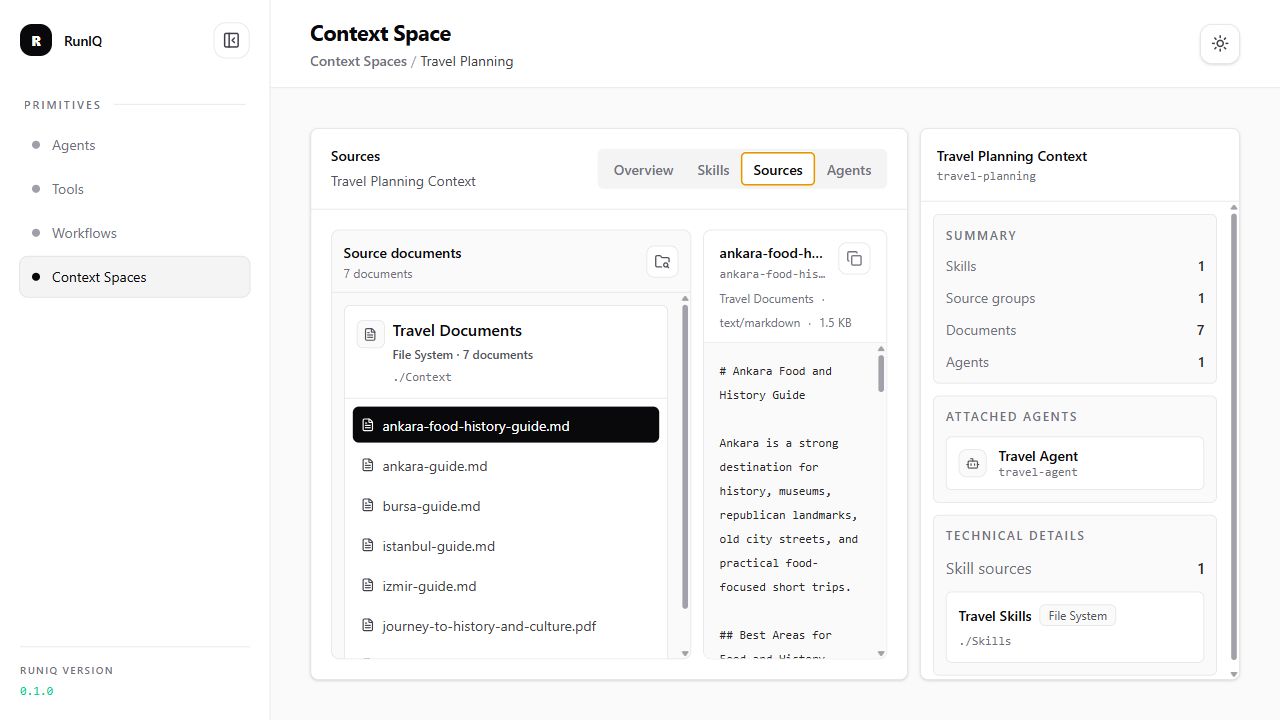
The dashboard shows the result of the source registration made in code. In the example above, FromFileSystem(...) defines a source with the id travel-docs, the display name Travel Documents, and the path ./Context.
After the application starts, Runiq reads that source definition and discovers the supported files under the configured folder. The sources view groups those readable documents by source, so developers can confirm that the runtime found the expected files before an agent tries to use them.
In context-source-documents.png, the developer can inspect:
- the registered source group,
- the documents discovered from the file-system source,
- each document path and name,
- the selected document preview,
- the content that can be searched and attached to an agent run.
This matters because Context Spaces are application-owned grounding material. If a file is missing, placed in the wrong folder, too large, or not a supported type, the agent will not be able to retrieve useful excerpts from it.
When an agent with this Context Space runs, Runiq searches the discovered source documents using the user's message. Relevant excerpts are added to the run instructions under Runiq Retrieved Source Context. The agent can then answer using that application-provided content instead of relying only on general model knowledge.
Preview protects against unsafe paths and blocks common app settings/secrets file names.