

Studio testing
Test how Context Space sources and skills affect agent runs.
Context Spaces become valuable when an agent run uses them.
A Context Space can contain source documents and skills. Source documents provide application-owned knowledge. Skills provide reusable behavioral guidance. When an agent with an attached Context Space is tested from chat, Runiq brings those pieces into the run before the LLM produces the answer.
Registered context
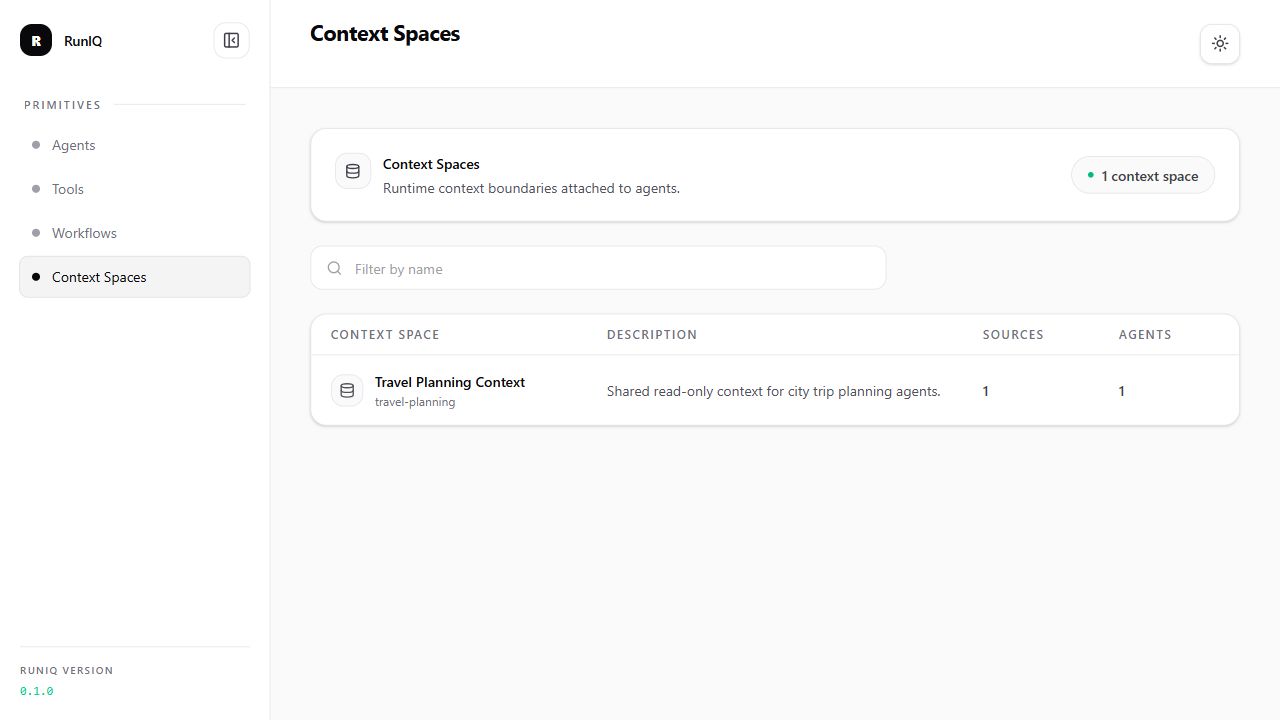
The dashboard first confirms that the Context Space is registered in the running host application. This matters because Context Spaces are not external configuration; they are part of the .NET application setup.
From this view, developers can verify that the expected Context Space exists, that source groups were discovered, and that the right agents are attached to it.
Skills and source context during chat
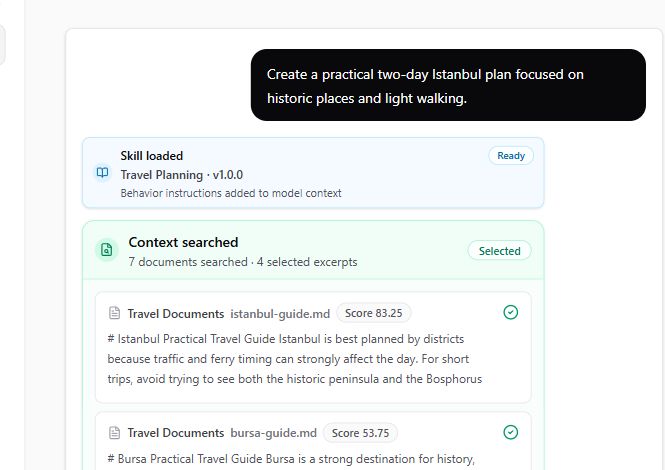
This screenshot shows the context pipeline during an agent chat run. The user asks for a two-day London trip, and the dashboard shows what Runiq added before and during the LLM call.
The Skill loaded event means the Travel Planning skill was discovered from the attached Context Space and added to the model context. This gives the agent reusable behavior instructions, such as how to plan a practical itinerary and how to use source-grounded information.
The Context searched event shows that Runiq searched the attached source documents with the user's request. In this run, seven documents were searched and one excerpt was selected. The London city guide document is ranked with a score, and the selected excerpt is shown in the stream so the developer can see what source material was sent toward the agent.
When an agent is tested from chat, Runiq prepares the run in stages:
- it loads the agent definition,
- it finds the Context Spaces attached to the agent,
- it loads discovered skills from those Context Spaces,
- it searches attached source documents using the user message and ranks matching documents,
- it adds selected source excerpts and skill instructions to the model instructions,
- it sends the enriched request to the LLM.
The skill tells the agent how to handle the task. The source excerpts give the agent information to use. Together, they make the response more grounded and more consistent.
The screenshot also shows a Weather tool call after context has been prepared. That is a separate part of the agent run: the LLM can decide that it needs a tool, Runiq executes the typed .NET tool, and the result is returned to the model so the final answer can combine source context, skill guidance, and live tool output.
For example, a travel agent can receive:
- source excerpts from city guide documents,
- a travel planning skill that says how to build practical, low-fatigue itineraries,
- weather output from an attached tool when the model requests it,
- the user's actual request from chat.
Runiq manages that assembly. The developer does not need to manually concatenate prompt text, file contents, and behavior instructions for every request.
What the developer should verify
During Studio testing, the goal is to confirm that context is actually entering the agent run.
Check that:
- the Context Space is attached to the expected agent,
- the source documents are visible and previewable,
- the expected skill is discovered,
- the chat run emits context and skill events,
- the final answer uses relevant source material,
- the agent is transparent when the attached sources do not contain useful information.
This is the main benefit of Context Space testing: developers can see whether application-owned knowledge and reusable guidance are being used before the same agent is exposed through a real product endpoint.